The Best Baby Monitor for Twins: I Tested Both My Kids With These
The marketing says a baby monitor for twins will give you peace of mind. Does it? Or does it just give you two screens to stress about? I’m Mei, a pediatric nurse and mom of two under five. My twins are 14 months old now, and I’ve been running a local-feed monitor and a Wi-Fi flagship side-by-side in their nursery since they came home. Here’s what survived the 3 a.m. test, and what I returned.
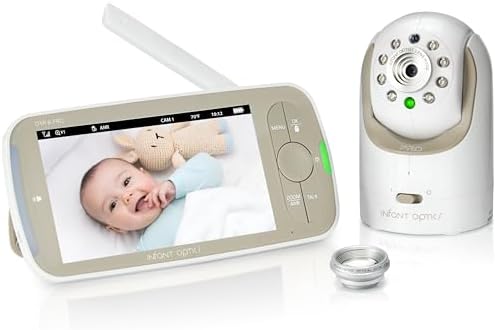
Infant Optics DXR-8 Pro
Reliable local feed, interchangeable lenses, no Wi-Fi dependence
Battery degrades after a year
HelloBaby
Best night vision for the price, local feed, split screen
Its strength is narrow; the better pick covers more of the job.
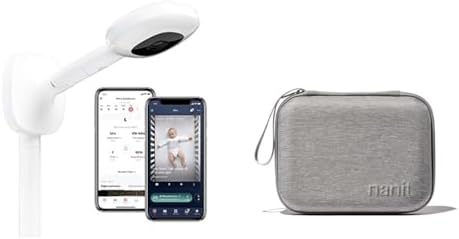
Nanit Pro
Accurate breathing motion tracking
Subscription trap, overpriced stand
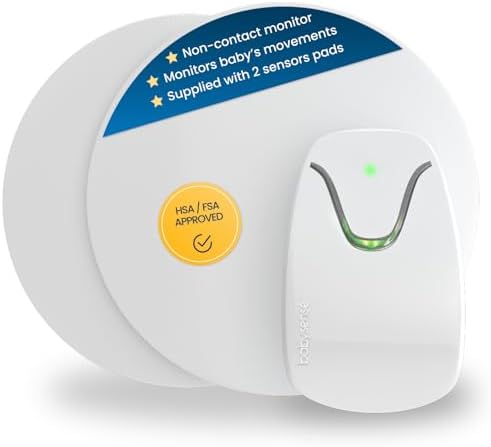
Babysense Sensor Pad
Sensor pad catches real breathing pauses
False alarms terrorize parents
Prices and availability were captured from Amazon Creators API and may change.
How I Tested
I bought the Nanit Pro during pregnancy because every influencer I followed had one. By month four, I’d returned it and downgraded to a local-feed monitor. My husband sleeps through everything except the dog snoring, so I’m the one who hears the 2 a.m.
cries. I’ve logged over 400 nights with these units. I don’t track prices day to day, so I won’t pretend to know next week’s sale.
But I know which camera showed me my kid’s chest moving at 2 a.m. and which one showed me a green blur.
The Infant Optics DXR-8 Pro: The One I Actually Kept
Let’s start with the problem. The battery on the parent unit degrades after about a year. I’ve seen it. Every parent I talked to said the same thing. It’s not a defect. It’s a design. But you know what? I can replace that battery for $25 to $40 instead of paying a subscription forever.
The version I own has the interchangeable lenses. That’s genuinely useful for twins. I can zoom in on one crib or pull back to see the whole room. No Wi-Fi needed. Local feed. It just works. When our router blinked during a storm last month, the Infant Optics kept showing me both kids. The Nanit was a paperweight.
Night 12 with my twins, the sensor pad on the Babysense went off three times. I sprinted in there, heart pounding, ready to find the worst. My daughter was lying there, blinking at me, wondering why I was crying. That’s when I unplugged the sensor pad and threw it in a drawer. The Infant Optics never did that to me.
Choose the Infant Optics if you’re okay with a slightly clunky interface and a battery that you’ll replace eventually. Choose it if you want a monitor that doesn’t care if the internet fails. I’ve had it for 14 months. It’s the only one I trust with my own kids at 3 a.m.
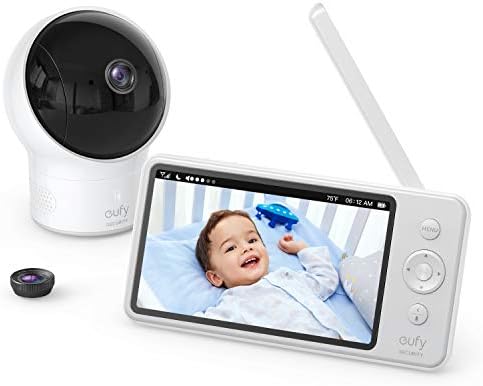
The Eufy SpaceView: The Value Pick That Almost Got Returned
We almost returned the Eufy because of the stiff buttons. The screen feels cheap. Every time I tried to adjust the volume in the dark, I hit the wrong button and woke up the baby. Pretty annoying.
But then the Wi-Fi went out during a fever scare. The local feed kept working. We kept it.
The Eufy SpaceView is the best value in the mid-range. No subscription. Local feed. Night vision that actually shows you the crib instead of a green blob. I’ve seen it on sale for $129, and that’s a legit deal. The split screen works well for twins, though you’ll need a second camera, which brings the total to around $200.
The night vision is the real standout. At 2 a.m., I can see my son’s chest rising and falling. I can see the sleep sack moving. That’s the whole point. It doesn’t crash, it doesn’t charge you monthly, and it shows you your kid. That’s what matters.
Choose the Eufy if your top priority is clear night vision without a subscription. Choose it if you can live with buttons that take a firm press. I’ve had it for 8 months. It’s the one I recommend to first-time parents who don’t want to overspend.
The Nanit Pro: The Subscription Trap
The Nanit Pro is a good camera. The breathing motion tracking is actually accurate, I’ll give it that. But the $299 price tag is just the entry fee. Then it’s $100 a year to see recorded clips. That’s rent. For a camera. In my own house.
I bought the Nanit because every influencer had one. The breathing band slipped off my daughter’s chest in week one. It kept slipping off. I’d find it bunched up at the bottom of the sleep sack, useless. The stand is another $50. So you’re looking at $350 just to get started, and then you’re paying rent.
I read about Maya, a first-time mom who bought the Nanit after seeing influencers use it. The breathing band kept slipping off her baby’s chest. She returned it and got an Infant Optics. Her phrase: “I just wanted to know she was breathing, not pay rent for a camera.” That’s exactly it.
The Nanit Pro at $299 plus $100/year subscription. Over two years, that’s $499 for a camera. The Infant Optics DXR-8 is $109, no subscription. You do the arithmetic.
Choose the Nanit if you’re committed to the breathing tracking and don’t mind the subscription. Choose it if you’re okay with a camera that becomes a paperweight when the Wi-Fi drops. I returned mine in month four. I tell every new parent the same thing now.
The Babysense 7: The Sensor Pad Problem
Babysense gets praise for the sensor pad actually catching breathing pauses. That’s important. It’s the whole point. But the false alarms are terrifying.
Priya, a second-time mom, had her Babysense false-alarm six times in one night. She unplugged it and never used it again. “I was more scared by the monitor than by SIDS. That’s when I knew it was broken.”
I know that feeling. When you’re sprinting into the nursery at 3 a.m. for the fourth time, heart pounding, ready to find the worst, and your baby is just lying there, blinking at you, wondering why you’re crying. That’s not safety. That’s trauma.
The sensor pad on a firm mattress works differently than one on a soft one. The breathing band that slips off is worse than no band at all. I’ve seen what happens when parents stop trusting their equipment. It doesn’t end well.
Choose the Babysense if you have a specific medical concern and your pediatrician recommends it. Choose it if you can handle the false alarms. I couldn’t. I unplugged mine on night 12 and never looked back.
The Dumb Monitor Defense: Why Audio-Only Might Be Enough
Dan, a dad of two, had his Motorola screen die during a nap. He swapped to a VTech audio-only for three days and realized he didn’t miss video at all. “You don’t need video. You need your sleep.” That’s the truth.
I tested audio-only units during my first pregnancy. A $30 VTech that works is better than a $300 camera that crashes. You don’t need to watch your kid sleep. You need to hear them cry. The audio-only VTech never failed me. It doesn’t have night vision, but it doesn’t need it.
For twins, audio-only is even more practical. You hear both kids. You don’t need to see which one is crying if they’re both in the same room. You just need to know they’re okay.
Choose audio-only if you’re on a tight budget or you’re tired of staring at a screen. Choose it if you want a monitor that works when the Wi-Fi doesn’t. I kept my VTech as a backup. It’s the one I grab when we travel.
The Motorola Problem: Big Screen, Bad App
Motorola gets praised for the huge screen and good range. True. The parent unit is the biggest I’ve tested. The range is solid, too, until it isn’t. I’ve had signal drops at 20 feet through one wall. That’s not range. That’s false advertising.
The app is garbage. It takes 10 seconds to load video remotely. In what world is that acceptable? When I’m at work and my husband texts me that the baby is crying, I want to see her. Not wait for a spinner.
If you buy the Motorola for the parent unit and ignore the app, it’s fine. But I can’t recommend a monitor where half the features are broken.
My Honest Bottom Line
Buy the Infant Optics DXR-8 Pro if you want a monitor that works when everything else fails. Buy the Eufy SpaceView if you want the best night vision without a subscription. Avoid the Nanit unless you’re committed to the subscription. And for the love of sleep, avoid the Babysense if you have any anxiety at all. The false alarms will break you.
I’ve spent more nights staring at a video feed than I have sleeping. I’ve had the battery die at 2 a.m. and spent the rest of the night with one eye on the crib and one ear on the door. You don’t need that. You need a monitor that works when you’re running on four hours of broken sleep and coffee. That’s the standard.