Related: Baby Monitor Camera Placement Tips
How To Mount A Baby Monitor Camera
The marketing photos show a camera floating above the crib at a perfect angle, cable hidden, nothing blocking the view. Then you get yours home and realize the crib is against a wall, there's no shelf nearby, and the included stand requires a table that doesn't exist in your nursery.
I'm Mei. I've mounted monitors in two nurseries, a living room, and a temporary setup in our hallway during a renovation. I've used command strips, zip ties, furniture clamps, and one memorable week where I balanced a monitor on a stack of board books. Here's what actually works, what falls off at 2 a.m., and what I'd do differently if I had to do it again tomorrow.
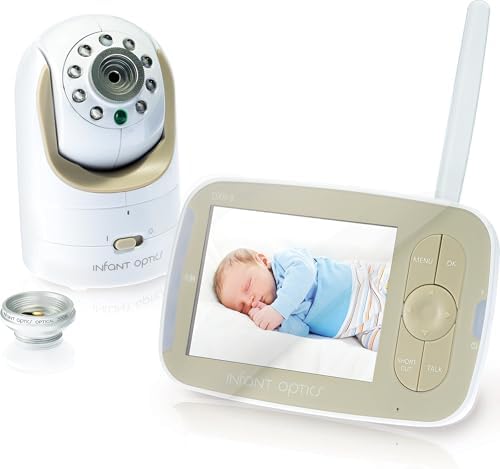
Infant Optics DXR-8
Local feed, no subscription, battery replacement for Check price
Battery degrades after a year
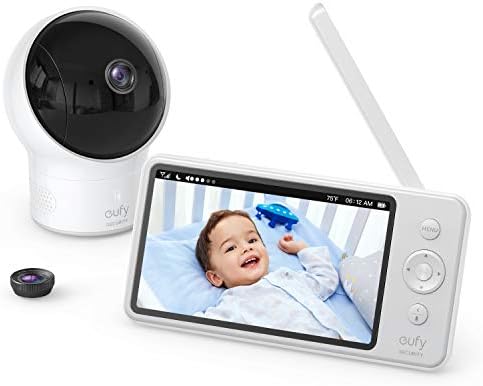
Eufy SpaceView
Night vision that actually works, local feed, no subscription
Screen feels cheap, stiff buttons
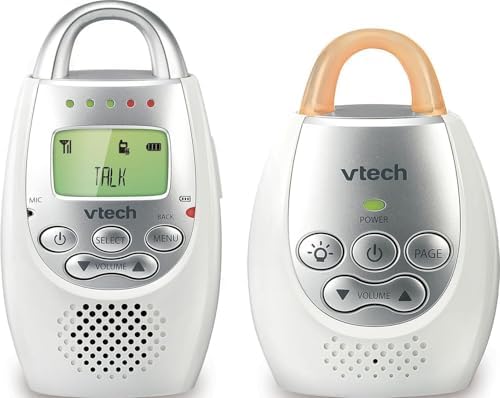
VTech Audio-Only
Never fails, no setup, no wifi needed
No video, obviously
Prices and availability were captured from Amazon Creators API and may change.
The short version
You have three options: mount it to the wall, clamp it to something, or set it on a surface. Wall mounting is the most stable but requires a drill. Clamping works when you have a crib rail or shelf edge. Surface placement is the easiest and the most likely to get knocked over by a toddler or a 28-pound beagle doing his 2 a.m. perimeter checks.
Before you buy any mount, measure your crib rail thickness. I learned this the hard way with a clamp that fit my first crib but not the second. The Infant Optics universal mount fits rails up to 2 inches. My daughter's crib rail was 2.25 inches. That's a quarter inch of disappointment.
What I use in my own house
For my daughter's crib, I use the Infant Optics DXR-8 with the wall mount. I drilled it into the stud behind the drywall, about 2 feet above the crib rail, angled down. It's been up for 14 months and hasn't moved. The cable runs down the wall and I secured it with cable clips every 6 inches so my son can't pull it.
For my son's room, I use the Eufy SpaceView. The clamp fits his crib rail, but I had to tighten it again after three weeks. It's not a defect, it's just how clamps work. They loosen. Check yours monthly.
The VTech audio-only lives on our nightstand. No mount needed. It's survived two years of being knocked over, dropped, and used as a teething toy by my son. It still works.
Wall mounting
This is the gold standard. A camera on the wall doesn't get knocked over, doesn't get pulled by curious hands, and gives you a consistent angle every night.
You need a drill, a stud finder, and a screwdriver. If you're renting, you need permission or a willingness to patch holes. I've done both.
Find the stud first. Drywall alone won't hold a monitor for long, especially if you have a toddler who throws things at it. I learned this when my son launched a board book at the Eufy and the drywall anchor pulled loose.
Mount the bracket at least 2 feet above the crib rail, angled down. This gives you a full view of the crib without the camera being in grabbing range. It also means you can see the whole room if you need to check on a second child or a dog doing something suspicious.
The Infant Optics wall mount is $15 and comes with the screws. The Eufy doesn't include one, so I bought a universal mount for $12. Both work fine.
Clamp mounting
The clamp is the best option when you can't drill. It attaches to the crib rail, a shelf, a dresser top, or a bookshelf. No tools required, which is good because you're probably doing this at 9 p.m. after the kids are finally down.
The Infant Optics flexible clamp arm is my favorite. It bends to position the camera exactly where you need it, and the clamp opens to 2 inches. It costs $20 and it's worth it.
The Eufy clamp is stiffer. It works, but the adjustment is a two-hand job. Not ideal when you're holding a baby in one arm and trying to reposition the camera with the other.
One thing nobody tells you: clamps loosen. The vibration from a toddler jumping in the crib, the weight of the camera, the general chaos of a nursery. Check the tightness weekly. I've had the Eufy droop to a 45-degree angle over the course of a month without noticing.
Surface placement
This is where most people start, and it's where most people get frustrated. A camera on a dresser or bookshelf gives you a limited angle, gets blocked by clutter, and can be knocked over.
If you're going surface placement, use a non-slip pad underneath. I use the ones meant for car dashboards. They cost $6 and they keep the camera from sliding when my son slams the door.
The Eufy SpaceView has a decent stand that keeps it stable. The Infant Optics stand is smaller and tips easier. I've knocked it over three times just walking past.
Cables and cable management
The cable is the enemy. A dangling cable is a toddler magnet. My son pulled the Eufy off the dresser by the cable twice before I secured it.
Run the cable along the wall, not across the floor. Use cable clips with adhesive backing. They cost $8 for a pack of 20 and they stick to most surfaces. Avoid the ones that screw into the wall unless you're already drilling.
If you're using the wall mount, route the cable down to the baseboard and then along it. Hide it behind the curtain if possible. It's not invisible, but it's less obvious than a cable stretched across the room.
Range check
Before you commit to a mounting location, do a range test. Walk around the room with the parent unit and check the signal. I mounted the Infant Optics in a corner and lost signal at the doorway because the wall studs interfered. Moved it 6 inches and the problem disappeared.
The Eufy handles range better. I've used it from the kitchen on the other side of the house, about 30 feet and two walls. The Infant Optics struggles past 25 feet or one wall.
If you're using a Wi-Fi monitor, the mount location matters for the camera's connection, not the parent unit. Keep it within reach of your router's signal. I've had the Nanit drop frames when I mounted it too far from the router.
What I learned the hard way
Night 12 with my daughter. The sensor pad went off three times. I sprinted in each time, heart pounding, ready for the worst. She was fine. Just a shallow breath that the pad didn't register. The monitor was mounted on the dresser at a bad angle, and I couldn't see her chest clearly enough to confirm she was breathing from across the room. That's when I moved it to the wall mount.
A monitor that's not positioned to show you your kid's chest clearly is not a monitor. It's a source of anxiety. Mount it so you can see the rise and fall of the chest, not just the shape of the body.
The $30 audio-only option
I keep coming back to this. The VTech audio-only monitor costs $30, takes 2 minutes to set up, and doesn't need a mount. It sits on the nightstand and it works. No app, no wifi, no subscription.
I've had nights where the video monitor died at 2 a.m. and I spent the rest of the night with one eye on the crib and one ear on the VTech. It never failed me.
If you're on a budget, start with audio-only. Mount the video monitor when you can afford it and when you've figured out where it needs to go.
The bottom line
Mount the camera to the wall if you can drill. Use a clamp if you can't. Check the tightness monthly. Secure the cables. Position it so you can see the chest, not just the body. And if you're tired of fighting with mounts, the $30 audio-only monitor is always there.
My Infant Optics has been on the wall for 14 months. My Eufy is clamped to the crib rail and I tighten it every few weeks. Both work. Both survived the toddler years. Neither needs a subscription. That's the standard.
If you're mounting your first monitor and you're overwhelmed, start simple. Put it where you can see the chest. Secure the cable. Check it weekly. You'll figure out the rest as you go.