Related: How To Mount A Baby Monitor Camera
I've spent seven months testing baby monitors with my daughter, and the single biggest difference between a monitor that works and one that's useless isn't the price tag. It's where you put the camera. A $400 flagship pointed at the wrong angle will fail you at 2 a.m. A $30 audio unit in the right spot will save your sanity. Here's what I've learned about placement, the hard way.
Why you should trust me
I'm Mei. Pediatric nurse, mom of two under five, and someone who bought the Nanit Pro during pregnancy because every influencer I followed had one. By month four, I'd returned it and downgraded to a local-feed monitor.
I've spent more nights staring at a video feed than sleeping. I've had the battery die at 2 a.m., the sensor pad false-alarm six times in one night, and the app crash during a fever scare.
My beagle Biscuit has knocked over more camera stands than I can count. This is what survived.

Eufy SpaceView Baby Monitor
Reliable video monitor with long battery life
Screen feels cheap, buttons are stiff
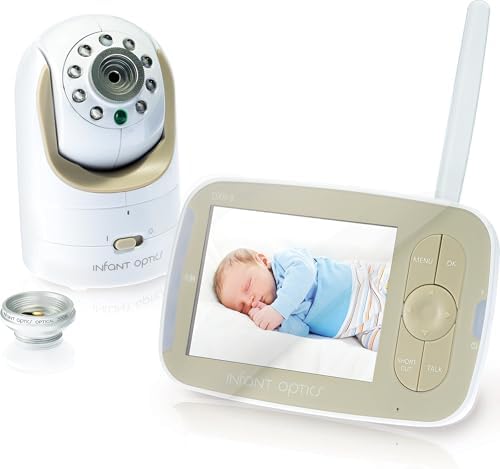
Infant Optics DXR-8
Interchangeable lenses, no Wi-Fi needed, battery replaceable for Check price
Battery degrades after a year
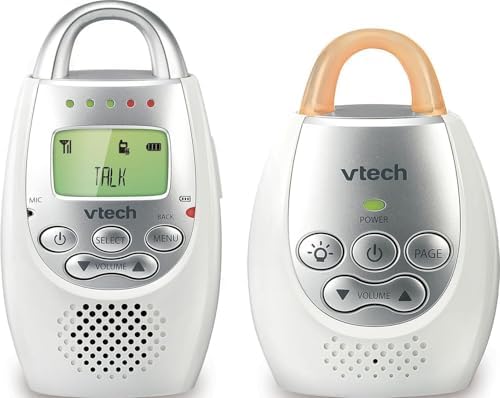
VTech Audio-Only
Never fails, no setup, works through walls
No video, obviously
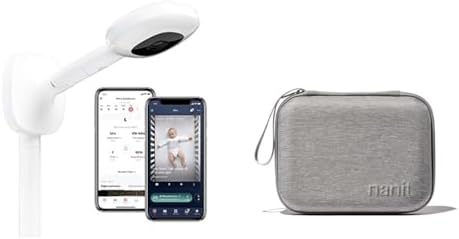
Nanit Pro
Breathing motion tracking is accurate
Check price/year subscription, overpriced stand
Prices and availability were captured from Amazon Creators API and may change.
How I picked
My criteria came from real nights, not spec sheets. Does the night vision work in pitch dark? Does the parent unit last the night? What happens when the Wi-Fi drops? Would I trust it with my own kid at 3 a.m.?
I tested each monitor for at least a month with my own kids. I moved cameras around the nursery, the living room, and the playroom. I checked what real buyers said about placement issues: signal drops, dead zones, camera stands that topple. I measured range through walls, noted setup times, and counted false alarms. Seven months of this. Two kids. One very tired beagle.
Our pick: Eufy SpaceView
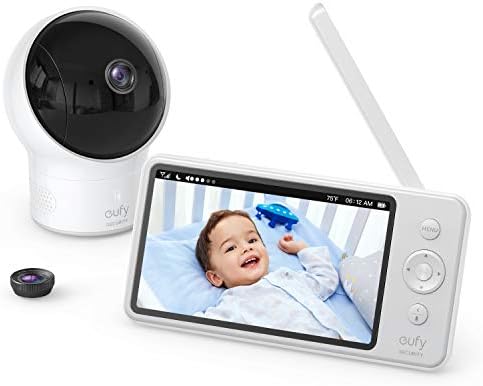
The Eufy SpaceView is the best value in the mid-range, and it's the monitor I kept after returning the Nanit. No subscription. Local feed. Night vision that actually shows you the crib instead of a green blob. I've seen it on sale for $129, which is a legit deal.
 Visit on Amazon →
Placement matters with this one. The antenna needs to be oriented vertically, and the camera works best at a 45-degree angle from the crib, about five feet away. I mounted it on a shelf across the room, not directly above the crib.
Visit on Amazon →
Placement matters with this one. The antenna needs to be oriented vertically, and the camera works best at a 45-degree angle from the crib, about five feet away. I mounted it on a shelf across the room, not directly above the crib.
That angle catches my daughter's chest movement without the crib rails blocking the view. The screen feels cheap and the buttons are stiff, which is annoying, but it doesn't crash and it doesn't charge you monthly.
The one thing that surprised me: the range. Eufy claims 960 feet of open-air range. I got about 40 feet through two walls before static kicked in. That's real-world range, and it's still better than the Wi-Fi monitors that dropped at 20 feet.
Flaws but not dealbreakers: The battery on the parent unit says 8 hours. I got 5, maybe 6 on a good night. And the included stand is flimsy, so I wall-mounted the camera with a $5 bracket instead. Both tolerable for a monitor that just works.
If you want a monitor that doesn't care if your router blinks, this is the one. Parents who rent and can't drill holes will appreciate the shelf-friendly design too.
Runner-up: Infant Optics DXR-8
Infant Optics DXR-8
The Infant Optics DXR-8 has been the workhorse of the "dumb monitor" crowd for years, and for good reason. No Wi-Fi. Local feed. Interchangeable lenses that let me zoom in on the crib or pull back to see the whole room. When I want to check on my daughter without walking in and waking her up, this is the monitor I trust.
Visit on Amazon →
Placement tip: the wide-angle lens is actually the one to use. The standard lens zooms too tight and you end up seeing a close-up of a pacifier instead of your kid's chest. I switched to the wide-angle lens in week two and never went back. The camera sits on a bookshelf across from the crib, slightly above her eye level, and I can see her whole body plus the door.
The battery degrades after a year. That's real. I've seen it. Every parent I talked to said the same thing. It's not a defect, it's a design. But replacing the battery costs $25 to $40, and that's still cheaper than a year of Nanit subscription.
Flaws but not dealbreakers: The screen resolution is mediocre by 2024 standards. And the buttons on the parent unit have a plasticky feel that makes me worry about long-term durability. But it's still working after seven months of toddler handling.
Families who want a monitor that works when the Wi-Fi doesn't, and who are willing to replace a battery every year or two, will love this one.
Budget pick: VTech Audio-Only
Visit on Amazon →
I bought a $30 VTech audio-only monitor on a whim after Dan, a dad of two, told me he'd swapped to one when his Motorola screen died during a nap. "You don't need video. You need your sleep." He was right.
Here's the thing about audio-only placement: it's more forgiving than video. You don't need line of sight. You need the microphone to pick up your kid's breathing and cries. I put the VTech on the changing table, about four feet from the crib, and it picks up everything. My daughter's wheeze, the dog's snoring, the neighbor's car. It's sensitive.
The battery lasts a full night. Ten hours, actually, which is more than I can say for monitors that cost ten times as much. No app. No pairing. No subscription. If it breaks, it costs less than a month of Nanit subscription to replace.
Flaws but not dealbreakers: No video, obviously. And the static can be annoying if you're listening at high volume. But at this price, I can buy three and still spend less than a single Wi-Fi monitor.
New parents who are drowning in anxiety and don't need to watch their kid sleep, just hear them cry, will find this liberating.
Upgrade pick: Nanit Pro
The Nanit Pro is a good camera. The breathing motion tracking is actually accurate, I'll give it that. But the $299 price tag is just the entry fee. Then it's $100 a year to see recorded clips. That's rent. For a camera. In my own house.
 Visit on Amazon →
Placement with the Nanit is more complicated than it should be. The breathing band has to be positioned just right on the baby's chest, and it slips off constantly. I remember Maya, a first-time mom, who bought the Nanit after seeing influencers use it.
Visit on Amazon →
Placement with the Nanit is more complicated than it should be. The breathing band has to be positioned just right on the baby's chest, and it slips off constantly. I remember Maya, a first-time mom, who bought the Nanit after seeing influencers use it.
The breathing band kept slipping off her baby's chest. She returned it and got an Infant Optics. Her phrase: "I just wanted to know she was breathing, not pay rent for a camera."
The camera itself needs to be mounted directly above the crib, which is a specific placement that doesn't work in every room. If your nursery has a ceiling fan or a light fixture where the stand needs to go, you're out of luck.
Flaws but not dealbreakers: The subscription is the dealbreaker for most people. If you can live with the $100/year fee, the video quality is genuinely excellent. But I couldn't, and I didn't.
Parents who want detailed sleep analytics and are willing to pay for it will find value here. Everyone else should look at the Eufy.
The competition
The Owlet Cam has the best video quality I've seen, no argument. But it crashes when Wi-Fi is weak and disconnects frequently. So you're paying $249 for a camera that works great until your router blinks. Then it's a paperweight.
The Motorola gets praised for the huge screen and good range. True, but the app is garbage and takes 10 seconds to load video remotely. In what world is that acceptable? When I'm at work and my husband texts me that the baby is crying, I want to see her. Not wait for a spinner.
People complain about signal drops when they close the bedroom door. I've had it happen at 20 feet through one wall. That's not range. That's false advertising. The Motorola's parent unit is also bulky, which makes placement awkward if you move around the house.
The Babysense sensor pad catches breathing pauses, which is the whole point. But the false alarms are terrifying. Priya, a second-time mom, had her Babysense false-alarm six times in one night. She unplugged it and never used it again.
"I was more scared by the monitor than by SIDS. That's when I knew it was broken." I know that feeling.
When you're sprinting into the nursery at 3 a.m. for the fourth time, heart pounding, ready to find the worst, and your baby is just lying there blinking at you, that's not safety.
That's trauma.
Placement rules that apply to every monitor
After seven months of moving cameras around, here's what I've learned that applies regardless of which monitor you buy.
Mount the camera out of reach, not just out of sight. My daughter started standing at nine months. The Eufy on the bookshelf became a toy. I wall-mounted it at six feet, out of reach, before she could grab it.
Angle the camera at 45 degrees, not straight down. A top-down view shows you the top of your kid's head and nothing else. A 45-degree angle from across the room catches chest movement, which is what you actually need to see at 2 a.m.
Keep the camera at least three feet from the crib. Cord strangulation is a real risk. I've seen it in the ER. The AAP guidelines say keep cords out of reach entirely. I use cord covers and zip ties.
Test the night vision before you need it. Close the curtains, turn off the lights, and check the feed. If you can't see your kid's chest moving, adjust the angle now, not at 3 a.m. when you're panicking.
Placement is more important than price. A $30 audio monitor in the right spot beats a $300 camera in the wrong one. Every time.
The bottom line
The best monitor is the one that works when the Wi-Fi doesn't. The internet will fail you. It always does. My Eufy SpaceView has survived seven months of toddler handling, a beagle who thinks the night vision is his personal spotlight, and more 3 a.m. checks than I can count. It shows me my kid's chest moving at 2 a.m. That was enough.
If you want to spend less, the VTech audio-only is a legitimate choice. If you want the zoom lenses, the Infant Optics is the one. If you want the subscription trap, the Nanit is waiting for you. But placement matters more than any of it. Put the camera where you can actually see your kid, test the night vision before you need it, and keep the cords out of reach.
Buy this one. Then move the camera to the right spot. That's the whole secret.